How to make a Santa Caught in My House AI video?
To make a santa caught in my house AI video, upload one photo of your living room, fireplace or Christmas tree and press Generate. Using your real room as the opening frame, the tool creates a warm night-time MP4 video with sound of Santa Claus setting presents under the tree, checking his parchment list by the tree lights and noticing the cookies on the table. Everything works in your browser with no prompt box and nothing to type.
1 room photo · Cozy night clip · No watermark
- Sample 1
Add your photo
Your photo is only used to make your video, never to train AI. Without an account, photos and videos are deleted 3 days after the video is ready.
Pick quality and length
This video: 27 credits · 100 credits are $9.90, and credits never expire
By creating, you confirm you have permission to use these photos. A video that fails is never charged.
No sign-up needed · Use credits to make your video
See a ready-made result instantly. No credits used.
Santa Caught In My House examples: photo in, video out
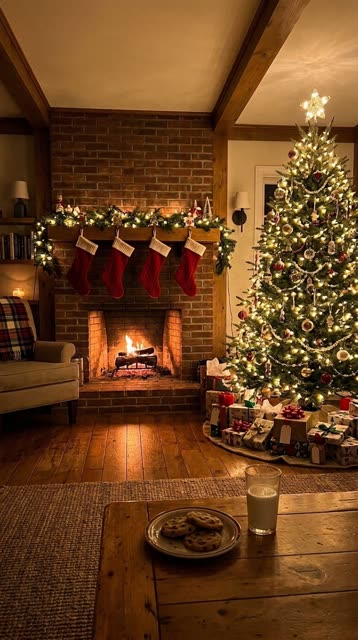 Example photo
How to use Santa Caught In My House
Upload one photo of your living room or fireplace
Choose a clear photo of your decorated living room, fireplace mantel or Christmas tree from your phone or computer. JPEG, PNG, WebP and iPhone HEIC files up to 30 MB work.
Pick length and quality, then press Generate
Review the resolution and duration settings and press Generate. You can pay once by card or PayPal in a window on the same page without creating an account.
Save and share your Christmas surprise
Your clip renders in a few minutes while you browse other pages. Download the watermark-free MP4 with sound to your phone photo album or play it on Christmas morning.
The short answer
Upload one photo of your living room or fireplace, choose your preferred quality and length, and press Generate to create a santa caught in my house AI video with sound. No app install or sign-up is needed, and every finished MP4 downloads cleanly with no watermark.
What makes a santa caught in my house video believable
A santa caught in my house AI video preserves your exact fireplace, stockings, furniture and Christmas tree so the moment feels unmistakably recorded inside your home. Rather than pasting a flat sticker onto a still photo, the video animates natural depth, shadows and warm firelight reflections as Santa moves through your space.
During the night-time clip, Santa steps quietly near the glowing tree with a velvet sack, sets wrapped gifts neatly beneath the branches, unrolls a small list in the warm light and smiles toward the cookies and milk on the table before heading back out. Gentle fireplace crackle, soft footsteps and faint distant sleigh bells complete the cozy Christmas Eve mood.
How to photograph your living room for Santa in my house footage
Eye-level nighttime photos lit primarily by your Christmas tree and fireplace give the warmest, most cinematic santa caught in my house result. Position your phone across the room so both the tree base and open floor space appear clearly in frame.
| Detail in your photo | Best choice | Result in the video |
|---|---|---|
| Lighting | Tree lights, fireplace glow or one dim side lamp | Soft shadows that match Santa's coat naturally |
| Foreground props | Plate of cookies and glass of milk on a coffee table | Gives Santa a natural focal point in the scene |
| Framing | Wide view showing floor, stockings and lower tree branches | Leaves open space for Santa to stand and kneel cleanly |
| Camera stability | Rest your phone on a shelf or hold steady without flash | Sharp walls and crisp ornaments from the first frame |
Shoot the picture after turning off harsh ceiling bulbs and clearing clutter from the rug where presents will be placed. One clean empty-room photo is all you need.
Ways families use a Santa in the house video on Christmas morning
Parents play their santa caught in my house clip right before opening stockings to spark pure amazement at the breakfast table. Because the video shows the exact stockings and cookies the kids set out the night before, younger children immediately connect the footage to their own Christmas Eve routine.
You can save the MP4 directly to your phone album, cast it to the living-room TV or send it to grandparents in a family chat. It also fits vertical social posts on TikTok, Instagram Reels and YouTube Shorts.
Privacy and sharing tips for home holiday videos
Remove personal mail, house numbers or open laptops from tables before snapping your living room photo if you plan to share the video publicly online. Your uploaded photo is used solely to build your video and is never used to train AI models.
When posting realistic AI holiday videos on public social platforms such as TikTok or YouTube, enable the app's AI-generated content label during upload so viewers know it is a festive AI creation.
FAQ
- How do I catch santa in my house on video with my real living room?
- Take one clear nighttime photo of your living room, fireplace or Christmas tree, upload it on this page, and press Generate. The tool animates Santa directly inside your actual room and returns an MP4 video with sound.
- Should I put cookies and milk in the photo before uploading?
- Yes, placing a small plate of cookies and a glass of milk on a visible coffee table or hearth adds a charming detail that blends naturally into the cozy night-time scene.
- How is santa caught in my house different from a security cam clip?
- Santa caught in my house uses a warm, cozy eye-level living-room look lit by tree lights and fireplace glow, while a security camera clip focuses on a high-corner CCTV surveillance perspective.
- Does the finished Santa video have sound?
- Yes. The generated MP4 includes natural holiday ambience such as quiet footsteps, soft fireplace crackle and subtle sleigh bells.
- Can I make the video from my phone without installing an app?
- Yes. The generator runs right in your mobile or desktop browser, and on a phone you can save the finished MP4 straight to your photo library.
- What photo formats and sizes are accepted?
- JPEG, PNG, WebP and iPhone HEIC photos up to 30 MB work. A sharp, dimly lit photo taken without camera flash delivers the best realism.
- Do I need a subscription to make one Santa video?
- No. You buy a one-time credit pack by card or PayPal in a window on the same page, with no recurring subscription and no credit expiration.
- Will there be a watermark on my Christmas video?
- No. Every finished video is delivered without a watermark.
- How long are my room photo and video stored?
- Without an account, uploaded photos and finished videos are deleted 3 days after completion. Signing in with the email used at checkout keeps your videos saved in My Works.
Make your Santa Caught In My House video
Upload, tap once, and your video is ready in a few minutes.